Tags & runtime delivery
Tags do two things in CommandRunner:
- Organize. Chips render below each command in the sidebar. The search bar accepts
#tagnameto filter. - Route at runtime. Two reserved tags (
@client,@server) control where the script lives: Server Storage, Replicated Storage, or both.
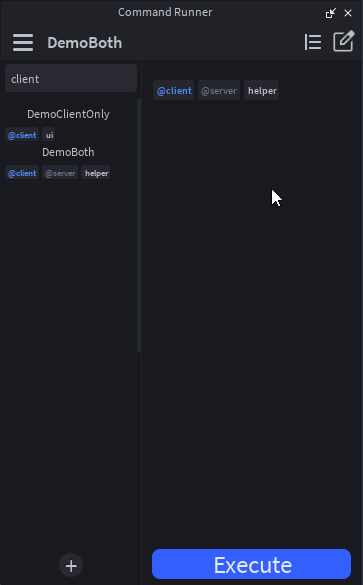
Adding tags
There are two storage layers, combined into one effective set per command.
Declared tags
The canonical source, declared in the module's return table:
return {
    Tags = { "selection", "@client" },
    Arguments = { ... },
    Run = function(props) ... end,
}
Declared tags travel with the script. They round-trip through the cross-place library, into bundled Globals, anywhere the script goes.
Extra tags
Per-machine convenience tags, added through the right-click menu without editing the script.
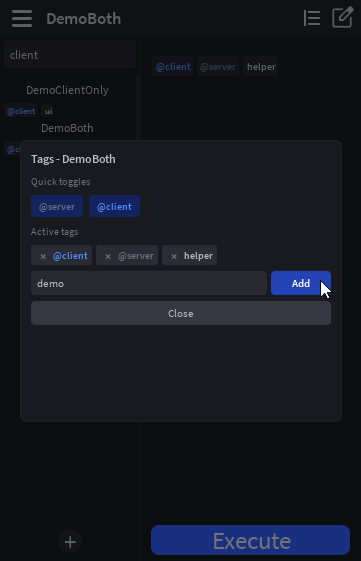
Right-click any command in the sidebar → Manage Tags…. Toggle the reserved @client / @server tags or type new custom tags. Edits write immediately to the __ExtraTags attribute on the script and update both the sidebar chip strip and the active-command tag card.
Extras are not serialized to the cross-place library. They're local-only bookkeeping.
Filtering the sidebar
The search bar splits on whitespace. Each token is either a name substring or, if it starts with #, a tag.
| Search input | Matches |
|---|---|
recolor | Commands whose name contains "recolor". |
#client | Commands tagged client (or @client; the @ is stripped). |
#client recolor | Commands tagged client AND name contains "recolor". |
#@client | Same as #client. Both forms work. |
Reserved tags
Two tags are special:
| Tag | Effect |
|---|---|
@client | Script is delivered to ReplicatedStorage.CommandRunnerRuntime.<name> so it can be require'd at runtime. |
@server | Reserved. Currently visual-only (distinct chip color); does not change routing today. Reserved for a future change. |
Custom tags can't start with @. The prefix is reserved. Typed tags get a leading @ stripped automatically.
Runtime delivery: where the script lives
Where the canonical script lives depends on which reserved tags are set. The plugin reconciles this automatically and you should not move the scripts by hand.
| Tags | Canonical location | Mirror |
|---|---|---|
@client only | ReplicatedStorage.CommandRunnerRuntime.<name> | (none) |
@client AND @server | ServerStorage.CommandRunnerScripts.<name> | ReplicatedStorage clone of canonical |
@server only / untagged | ServerStorage.CommandRunnerScripts.<name> | (none) |
The plugin keeps both surfaces in sync. You don't manually move scripts around. Flipping @client on or off via the Manage Tags popup (or editing Tags in the script and saving) triggers the relocation.
Why move (mostly), not mirror?
Plugins re-run in the play DataModel as a client. From play-test client context, ServerStorage is invisible. If @client only mirrored to ReplicatedStorage, then "Save edits" on stop play test would silently discard your edits to the ReplicatedStorage copy. Move-on-tag means the @client-only script lives in ReplicatedStorage the whole time, so the edit-DM and play-test-DM both point at the same Instance.
Why mirror in the dual case?
@server says "the ServerStorage copy is the source of truth: edit it there, history-record it there." @client says "I also need this available at runtime." With both tags set, the canonical lives in ServerStorage (server-side ergonomics) and a delivery clone lives in ReplicatedStorage (runtime availability). The mirror is a copy, not a link. The plugin re-clones canonical → mirror whenever they diverge.
In play test, you can edit the ReplicatedStorage mirror and Studio offers "Save edits" on stop. For dual-tagged (@client + @server) commands, those edits are clobbered when you toggle the widget back on. The plugin re-clones from the ServerStorage canonical. The @client-only case is the one that survives play-test edits, since the canonical IS the ReplicatedStorage script.
Consuming a @client command at runtime
Once a script is in ReplicatedStorage.CommandRunnerRuntime, any LocalScript can require it:
-- StarterPlayer.StarterPlayerScripts.MyConsumer (LocalScript)

local ReplicatedStorage = game:GetService("ReplicatedStorage")
local runtime = ReplicatedStorage:WaitForChild("CommandRunnerRuntime")

local mod = require(runtime:WaitForChild("MyClientCommand"))

-- The plugin's props table doesn't exist outside the plugin.
-- Build a minimal stand-in for the fields your command actually uses.
local props = {
    Selected = {},
    Arguments = { ... },
    SendNotification = function(self, msg) print(msg) end,
}
mod.Run(props)
See the runtime delivery recipe for a more complete example with a stand-in props builder.
Reconciling tag changes
CommandRunner re-runs the routing logic on these triggers, all edit-mode-only:
- Plugin load: sweeps all command names in both containers and resolves them.
- Widget toggle: same sweep.
- Save flow: when you click the edit-pencil "save" icon, declared
Tagsare re-parsed and the script is relocated if needed. __ExtraTagschange: toggling@client/@serverin the Manage Tags popup re-runs the sync immediately.
Editing Tags = {...} directly in the script editor and bypassing the save button does not auto-relocate. Hit save, or toggle the widget, to apply changes that way.