Module shape
Every command is a ModuleScript that returns one table. Here's the full surface area:
return {
    -- Wrap Run in one ChangeHistoryService recording.
    -- Default: true. Disable for custom or no ChangeHistoryService implementation
    -- If no AutoRecordChanges key is present, the CommandRunner assumes it to be true.
    AutoRecordChanges = true,

    -- Optional. When true, the plugin requires a separate "DEBUG" clone
    -- under ServerStorage.CommandRunnerDebug so you can inspect the loaded copy.
    Debug = false,

    -- Optional. Hide the Execute button. Useful when the command is fully
    -- driven by per-argument Run callbacks (e.g. a button-only utility panel).
    DisableExecuteButton = false,

    -- Optional. Organizational labels rendered as chips below the command
    -- name in the sidebar. See "Tags & runtime delivery" for routing semantics.
    Tags = { "selection", "@client" },

    -- The argument schema. Keys become the form labels. See "Argument types".
    Arguments = {
        MyArg = {
            Type = "string",
            Default = "",
            Description = "Tooltip text",
            LayoutOrder = 1,
        },
    },

    -- The body of the command. Receives a props table. Required.
    Run = function(props)
        -- ...
    end,

    -- Optional lifecycle hooks. Validate, OnExecuted, OnError, OnSelected,
    -- and OnDeselected are all available. See "Lifecycle hooks".
    OnExecuted = function(props, args, result)
        -- ...
    end,
}
Only Arguments and Run are required. Everything else is optional and has a sensible default.
Field reference
AutoRecordChanges (boolean?)
Default true. The plugin wraps Run in ChangeHistoryService:TryBeginRecording / FinishRecording, so one Ctrl+Z undoes the whole operation.
Set to false if your command does no destructive work (e.g. it just prints to the console, frames the camera, or shows a notification). With AutoRecordChanges = false the recording isn't opened, so you don't pollute the undo stack.
If you call props:RunCommand(name, args) from inside Run, the inner call always skips its own recording. The outer recording covers everything.
Debug (boolean?)
Default false. Set to true while you're iterating to make CommandRunner clone the module into ServerStorage.CommandRunnerDebug instead of its usual hidden CommandCache folder. The clone is suffixed " - DEBUG SCRIPT CHANGES DONT SAVE" so you can open it and read the exact source the plugin loaded. Useful when something feels off and you suspect stale source.
Don't ship commands with Debug = true. The cloned debug copy is regenerated on every Execute, so any edits inside it are thrown away.
DisableExecuteButton (boolean?)
Default false. Hides the Execute button at the bottom of the args panel.
Use this when the command is purely UI: every interaction happens through per-argument Run callbacks (a button argument that does work, a switch that toggles a setting, a label that updates with status). With no top-level Run, the Execute button has nothing to do.
When DisableExecuteButton = true, you can still define a top-level Run, but it'll only fire if you trigger it from another command via props:RunCommand(name).
Tags ({string}?)
Optional list of organizational labels. Rendered as small chips below the command name in the sidebar. Two tags carry runtime-delivery meaning:
@clientonly: the script is moved out ofServerStorage.CommandRunnerScriptsintoReplicatedStorage.CommandRunnerRuntimeso it can berequire'd from a LocalScript at runtime.@clientand@server: the canonical copy stays inServerStorage.CommandRunnerScripts(so server-side edits and ChangeHistory work normally) and a mirror clone is kept in sync inReplicatedStorage.CommandRunnerRuntimefor runtime delivery.@serveronly (or no routing tag): stays inServerStorage.CommandRunnerScripts. Currently the@serverchip is visual only.
Everything else is purely organizational. Filter the sidebar with #tagname (e.g. #selection, #client).
See Tags & runtime delivery for the full routing table and the __ExtraTags attribute that lets you add tags from the right-click menu without editing the script.
Arguments ({[string]: ArgumentDef})
Required. Each entry becomes one input control in the args panel.
Arguments = {
    Color = {
        Type = "string",          -- Required. See "Argument types".
        Default = "Bright red",   -- Required. The seed value.
        Description = "...",      -- Optional. Hover tooltip text.
        LayoutOrder = 1,          -- Optional. Lower = higher in the panel.

        -- Optional. Per-argument callback. Fires when the user changes
        -- this argument's value (text commit, toggle click, button press).
        Run = function(props, value) end,

        -- Type-specific fields. ClearTextOnFocus + PlaceholderText for "string",
        -- Min/Max/Step for "number", Options + AllowCustom for "dropdown", etc.
    },
}
Argument values are persisted as Roblox attributes on the ModuleScript itself, so they survive widget toggles, plugin reloads, and Studio restarts. See argument types for the per-type details.
Run (function(props))
Required. The command body. CommandRunner calls this when:
- The user clicks the Execute button at the bottom of the args panel, or
- Another command calls
props:RunCommand("YourCommand", args).
The single props argument is a table of helpers documented in the props table.
Errors thrown inside Run are caught by the plugin and reported via warn and a toast notification. The ChangeHistoryService recording is committed regardless, so any partial work survives.
Lifecycle hooks (optional)
Five optional hooks let your command react to events around Run. Plugin-managed lifetime — no :Connect / :Disconnect.
| Field | Signature | Fires when |
|---|---|---|
Validate | (props) -> boolean, string? | Before Run. false aborts; the optional string toasts. |
OnExecuted | (props, arguments, result) | After Run returns successfully. |
OnError | (props, arguments, err) | After Run throws. |
OnSelected | (props) | The user picks the command in the sidebar. |
OnDeselected | (props) | The user picks another command, deletes this one, or closes the widget. |
See Lifecycle hooks for full semantics, scope rules, and worked examples.
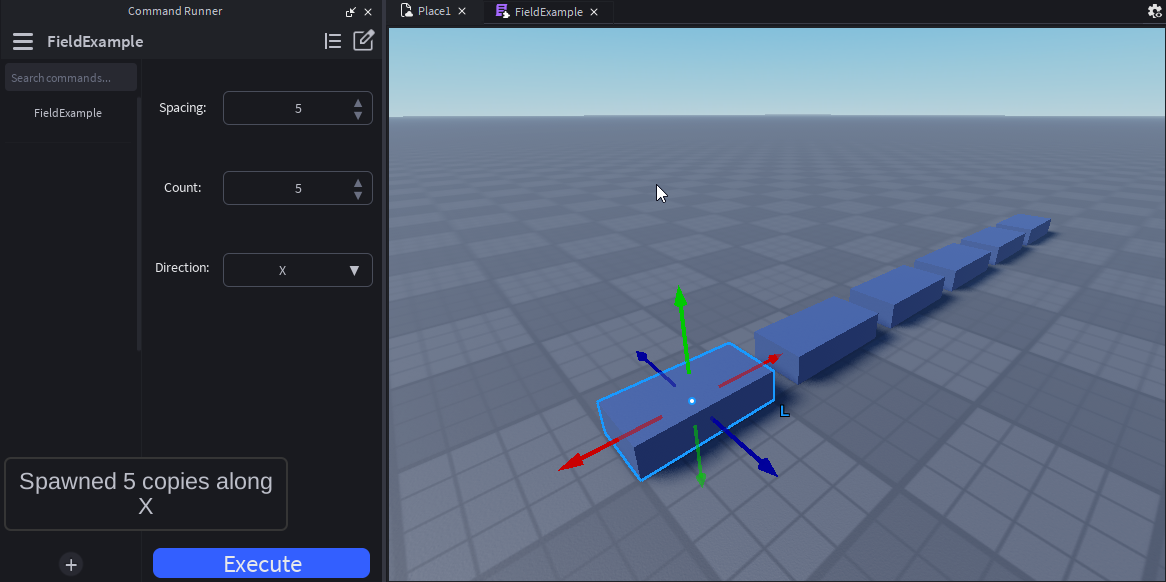
A complete example
Here's a real command that uses every optional field:
local Types = require(script.Types)

return {
    AutoRecordChanges = true,
    Debug = false,
    DisableExecuteButton = false,
    Tags = { "selection", "geometry" },

    Arguments = {
        Spacing = {
            Type = "number",
            Default = 4,
            Min = 0,
            Max = 100,
            Step = 0.5,
            Description = "Studs between each duplicated copy",
            LayoutOrder = 1,
        },
        Count = {
            Type = "number",
            Default = 5,
            Min = 1,
            Max = 50,
            Step = 1,
            LayoutOrder = 2,
        },
        Direction = {
            Type = "dropdown",
            Default = "X",
            Options = { "X", "Y", "Z" },
            AllowCustom = false,
            LayoutOrder = 3,
        },
    },

    Run = function(props: Types.Props, arguments: Types.ArgumentResult)
        local source = props.FirstSelected
        if not (source and source:IsA("BasePart")) then
            return props:SendNotification("Select a part first")
        end

        local axis = Vector3.FromAxis(Enum.Axis[arguments.Direction])
        local step = axis * arguments.Spacing

        for i = 1, arguments.Count do
            local copy = source:Clone()
            copy.Position = source.Position + step * i
            copy.Parent = source.Parent
        end
    end,

    OnExecuted = function(props, args, _result)
        props:SendNotification(string.format(
            "Spawned %d copies along %s",
            args.Count, args.Direction
        ))
    end,
}