Cross-place library
Studio plugins can persist data per-user via plugin:SetSetting. CommandRunner uses that to give you a personal library of commands that's available in every place you open.
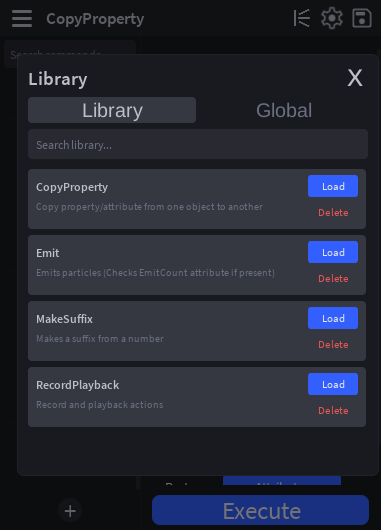
Opening the library
Click the book icon in the top bar (next to the edit pencil). The Library popup opens.
The popup has two tabs:
- Library: your personal saved commands. Persists across places, lives in plugin settings.
- Global: commands bundled with the plugin itself. Read-only; you can Load them but not Delete or modify the bundled source.
Saving a command to your library
Right-click a command in the sidebar → Save to Library. The plugin captures:
- The script source.
- The top-level
Description(if defined in the module). - All argument presets from
__ArgumentPresets. - A timestamp.
If a library entry with that name already exists, the plugin asks before overwriting.
What does not get captured:
__ExtraTags, extras are local-only bookkeeping. The declaredTags = {...}in source travels because it's part of the script.__HiddenArgs/__HiddenSectionExpanded, also local-only.- Per-place
Configurationvalues.
Loading a command from your library
Open the Library popup → click Load on the entry you want. The plugin checks whether a script with that name already exists in ServerStorage.CommandRunnerScripts:
- No collision: the entry is created fresh.
- Collision: you're asked whether to Replace. If you accept, the existing script's
.Sourceis overwritten, the Instance itself is preserved, so any__InstanceArg_*children, attributes you didn't recognize, etc. survive.
After load, if the command's declared Tags include @client, the plugin runs its routing reconcile and the script ends up wherever it should be.
Deleting a library entry
Open the Library popup → click Delete on the entry. Confirms before removing, the entry is wiped from plugin:SetSetting("Library_v1", ...) and won't reappear in any place.
The Globals tab
CommandRunner ships with a small set of curated example commands under Main/GlobalScripts/. They're not auto-installed, you opt into each one.
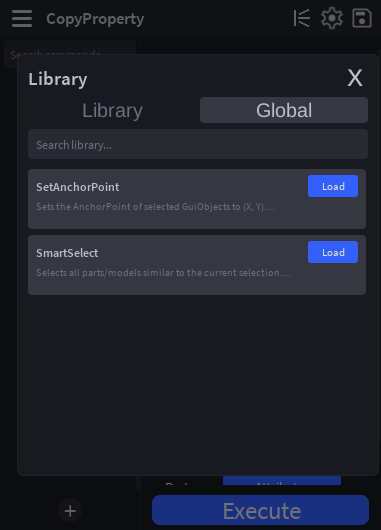
Switch to the Global tab and click Load on any entry. The plugin clones the bundled ModuleScript (and any sibling modules like SmartSelect/Types) into ServerStorage.CommandRunnerScripts. From there, it behaves exactly like any command you'd authored. Edit it, save it, customize it.
The Delete button is hidden on Globals, you can't remove bundled commands. If you don't want one in your local library, just don't Load it.
Storage detail
Personal library entries are JSON-encoded into one big plugin setting:
plugin:GetSetting("Library_v1") → {
    [<commandName>] = {
        source = "...full script text...",
        description = "...",
        presets = { ... },
        savedAt = <unix timestamp>,
    },
    ...
}
The _v1 suffix is intentional. If the storage shape ever changes in a backwards-incompatible way, the bumped key lets old and new schemas coexist while migrations run.