Notifications
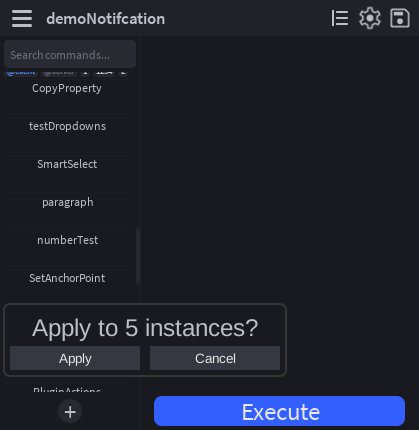
props:SendNotification shows a toast at the bottom of the CommandRunner widget. Two forms.
String shorthand
For the 80% case, quick status messages that auto-dismiss:
props:SendNotification("Done, 12 parts updated")
This uses default settings: a 7-second timeout, no action buttons.
Full table
For confirmations, dismissable warnings, or anything with action buttons:
props:SendNotification({
    Text = "Replace existing item?",
    Timeout = 3,

    Button1Text = "Replace",
    Button1Color = Color3.fromRGB(220, 50, 50),
    Button1Callback = function()
        -- ...do the replacement...
    end,

    Button2Text = "Cancel",
    Button2Callback = function()
        -- ...optional cleanup, or omit entirely...
    end,
})
Field reference
| Field | Type | Purpose |
|---|---|---|
Text | string | The message. |
Timeout | number? | Seconds before auto-dismiss. Default 7. Confirmation toasts that need a real click should pass a generous value (e.g. 8); there is no "sticky" mode currently. |
Button1Text | string? | If set, renders the first action button. |
Button1Callback | (() -> ())? | Fires when button 1 is clicked. |
Button1Color | Color3? | Optional background color for button 1. |
Button1TextColor | Color3? | Optional foreground color for button 1's label. |
Button2Text | string? | If set, renders the second action button. |
Button2Callback | (() -> ())? | Fires when button 2 is clicked. |
Button2Color | Color3? | Optional background color for button 2. |
Button2TextColor | Color3? | Optional foreground color for button 2's label. |
Clicking either button dismisses the toast immediately. There's no need to call any "close" API yourself.
Pattern: confirm-then-act
A common pattern is "ask before doing something destructive":
Run = function(props)
    if #props.Selected == 0 then
        return props:SendNotification("Select something first")
    end

    if #props.Selected > 50 then
        props:SendNotification({
            Text = string.format("Apply to %d instances?", #props.Selected),
            Timeout = 8,    -- give the user time to read and decide
            Button1Text = "Apply",
            Button1Callback = function()
                applyTo(props.Selected)
            end,
            Button2Text = "Cancel",
        })
    else
        applyTo(props.Selected)
    end
end
This works because Run returns immediately after queueing the toast. The actual work happens inside Button1Callback when the user confirms. The ChangeHistoryService recording opened around Run will already be closed by then, so the deferred work runs as its own undo step. If you need it inside the same recording, do it synchronously without a confirmation.
Where notifications render
Toasts stack inside MainUI.NotificationContainer. You can have multiple toasts on screen at once; the most recent is at the bottom. Every toast auto-dismisses after Timeout seconds — there is no sticky mode in this build, so for confirmations pick a Timeout long enough that the user can read and click before it disappears.