Hide & show arguments
A long arg list gets unwieldy fast. CommandRunner lets you mark individual arguments as hidden, they vanish from the visible card list but still get values passed to Run.
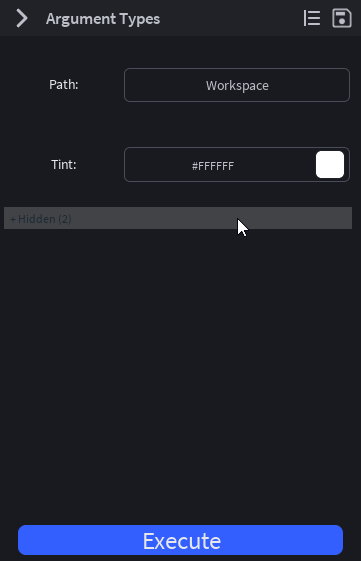
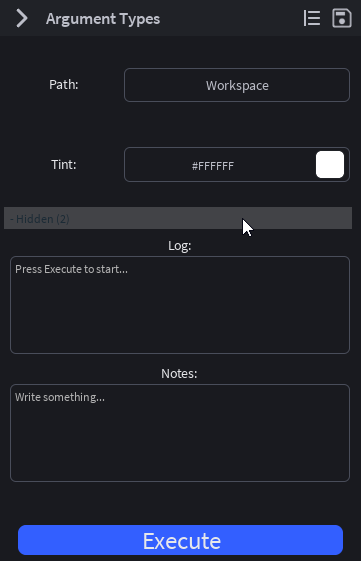
Hiding an argument
Right-click any argument card → Hide Argument. The card disappears from the visible list. A ▸ Hidden (N) toggle appears at the bottom of the args panel showing how many cards are hidden.
Showing it again
Click the ▸ Hidden (N) toggle to expand the hidden section. The hidden cards appear directly above the toggle. Right-click any of them → Show Argument to bring it back into the visible list.
What hiding does NOT change
- The argument's value is still in
arguments.<key>(andprops.Arguments.<key>) whenRunfires. - Per-argument
Runcallbacks still fire on value changes. - Presets still capture and restore hidden arguments.
- The argument still occupies a row in the auto-generated
Types.ArgumentResulttype.
Hiding is purely cosmetic, a UI declutter, not a way to disable functionality.
Storage
Hidden state is stored on two attributes of the command ModuleScript:
__HiddenArgs, JSON-encoded array of argument ids that are hidden.__HiddenSectionExpanded, boolean for whether the toggle is currently expanded.
Both persist across plugin reloads and Studio restarts. They're per-place (don't travel through the Library).
When to hide vs. when to remove
Hide an argument when it's:
- A power-user knob most users don't need.
- Only relevant in edge cases (e.g. a debug switch).
- Configured once and rarely revisited.
Remove an argument from Arguments entirely when:
- It's no longer used by
Run. - The schema has changed and the argument is genuinely deprecated.
If you remove an argument from the schema, CommandRunner sweeps the corresponding attribute (and __InstanceArg_* ObjectValue, if applicable) on the next setArguments reconcile. No leaking state.