Auto-generated UI
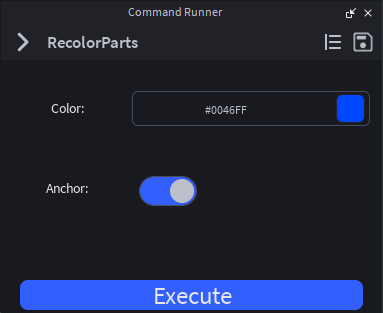
Declare an Arguments schema. The plugin builds the form for you: text fields, toggles, dropdowns, instance pickers, sliders. No GuiObject wiring, no Roact, no boilerplate.
One-undo execution
Every command runs inside a single ChangeHistoryService recording. One Ctrl+Z reverses the entire operation, even if it touched a thousand instances.
Cross-place library
Save commands to your personal library and reuse them across every place. Bundled Global commands ship with the plugin. Browse, load, customize.
Typed arguments
The plugin auto-generates a Luau ArgumentResult type for each command's schema. New commands ship with the type annotation pre-wired, so you get full IntelliSense on props.Arguments on save.
Runtime delivery
Tag a command @client and the plugin ships it to ReplicatedStorage at edit-time, ready to require() from a LocalScript at runtime.
Composable
Call other commands from inside Run via props:RunCommand(name, args). Build small, sharp tools and compose them into bigger workflows.
A command in 25 lines.
Click + and the plugin scaffolds a typed starter template. Fill in the Arguments schema and the Run body. The plugin handles the UI, wires undo/redo, and gives you a typed props table.
local Types = require(script.Types)

return {
	Arguments = {
		Color = {
			Type = "color",
			Default = Color3.new(1, 0, 0),
			Description = "Color to apply",
		},
		Anchor = {
			Type = "switch",
			Default = true,
			Description = "Anchor each part after recoloring",
		},
	},

	Run = function(props: Types.Props, arguments: Types.ArgumentResult)
		for _, object in props.Selected do
			if object:IsA("BasePart") then
				object.Color = arguments.Color
				object.Anchored = arguments.Anchor
			end
		end
	end,
}
Try it.
Pick a command, tweak its arguments, hit Execute. Same schema-to-form-to-output loop you'll get inside Studio, just without the part. Flip to Source to see the Lua that drives the form.
Color to apply to the part.
Stage
Output
No commands executed yet.